
Showing posts with label time management. Show all posts
Showing posts with label time management. Show all posts
Friday, August 26, 2011
Sharing best practices involving technology
As educators, we all struggle with ways to avoid reinventing the wheel. The Internet has certainly helped in this regard - it is the 'go to' place for so many ideas, that - when a new idea hits me, my first step is to search the web and see if and how others have approached it. But what about great ideas and best practices within my own district and building? Ironically, the ideas put into practice three doors down the hall often seem more remote than than the ones posted to some blog from across the country.
Why is that? Teachers tend to be islands - we get mired down in the day-to-day, and our 'free time' - prep periods and meeting block times - are far from free - we're grading, designing materials, contacting parents, updating homework sites, meeting with administration, giving extra help... and, at least in my district, budget constraints have eaten into this time even more - we've lost PD time, so meeting slots that might have been spent collaboratively become times for dealing with administrative issues.
So, how can we address this, and find time to use the resources closest to us - our colleagues in the building?
In my school system, we've created a stipend-based position, the TTL - Teacher Technology Leader. The idea is that, in each building, there are a few educators who try to keep their fingers on the technological pulse, as it were, and help their peers gain experience and comfort regarding integrating the new tools into their traditional toolbox.
Last year was our first go at this - it was a growing process, and the parameters of the role were ambiguous at best. Most teachers weren't really aware of our role in the buildings, and - with the TTLs themselves in a bit of a gray area - our skills were under utilized. So, how do we better use this position to help all teachers work more collaboratively, and stay informed regarding ideas and tools that others have found successful, within the time and budgetary constraints of a system?
Here are some ideas I have...
*I learned that, at the elementary schools in my district, they have a ‘coaching substitute” - a floating sub who can cover classes in order for a teacher to go observe / get PD. This is a great idea (why didn't my school know about this?) - this gives educators a chance to step out of their room and into that classroom down the hall, to observe that new tool / idea in use...
*... which brings up the next question - how can we help teachers know what great ideas are available in the building, so they can make an informed decision about who and what to observe? I think the TTLs should work as a hub for disseminating good models of technology use in the building – basically, we can reach out to staff, with emails, brief reminders at meetings etc., encouraging teachers to share what they are doing with us. We can then set up a time to observe it ourselves, and report back to department heads to then encourage use and discussion amid the department staff. We could set up a spreadsheet on which people can sign up to observe a class - using Google Calendar's new appointment feature, potentially, and help streamline the process.
*The key is that we need to firm up a structure / framework from top down, and encourage greater effective use of technology, along with collaboration. What has tended to happen is we’ve had good ideas floating around the building but, as with most great ideas, actually sharing and implementing them beyond the individual rooms can be difficult... Using the TTLs as a conduit seems to make some sense in this regard.
*Beyond this, we can also firm up a schedule / opportunities for TTLs to coach our peers – set periods where we can go in and help other teachers (1 or 2 of our meeting periods per week) plus other times where we can get a dept chair to help cover a class while we go set something up / guide someone in tech use or run a mini pd for a period, perhaps in conjunction with a teacher who has successfully implemented a lesson.
*As part of this, we will probably start with a weekly email to staff, highlighting one idea or one tool that teachers may want to put to use, and directing staff to this blog or another site for more information. The key is to keep that email brief, so it will actually be read, and not become another piece of spam fodder...
It seems to me that the key is to have a good, clearly defined set of descriptors for the TTLs - a clear process and structure that is consistently applied.
How has your system addressed these needs? What other ideas are floating around??


Thursday, August 11, 2011
Google Docs for group classwork
On my team, we use Google Docs for a lot of our "paperwork" - each student sets up an account at the start of the year, and each teacher on team also has a Google Docs account (our school has also partnered with Google, so that we have our own 'channel' on google docs).
I've already discussed one way we use GD on team - students do their organizing and drafting of papers right online, streamlining the writing / editing process while saving a ton of paper (with school budgets being what they are, every dime counts!).
Beyond this, we do a number of collaborative tasks - both among the staff and the students - through GD as well. Our team newsletters, sent out at least monthly, used to be constructed via a chain of emails - each teacher would send me their snippet, I'd then merge them into a doc, and then send it out. Now, we keep a newsletter "shell" and just fill it in by a set time / date - each of us adding our blurb when we have the time - and then, once it's set, I email it out and post it on our team discussion board. Much easier.
Last year, I wanted to use GD to facilitate collaborative discussions among the students, as well. I started with a fairly standard classroom discussion model: while reading Crispin, at set intervals students met in groups to discuss specific chapters. The kids had been tracking facets of the novel in a series of shell note sheets, and - on discussion days - kids would be put into groups, and each group was given one facet as a focal point. After a few minutes, they would send one member to the board to write a key quote they found, and their group's analysis of its importance. We'd then discuss these as a class.
This format had a few problems. First, the board would get crowded pretty quickly - as would the space where students stood while writing. Often, one student would have to wait for another to finish. Second, the work was transient - by the end of the period, I'd have to erase the work in order to be ready for another class.
So, this brought me to my inquiry - could I figure out a way to use GD to streamline the process and eliminate the bottleneck, while using only a limited amount of computers (we have a laptop cart on team that, usually, only has around 6 working units).
Here's what I came up with. My solution uses 6 laptops and one LCD projector.
I began by setting up a discussion document that students could access on Google Docs. I made it public, so anyone could edit it, and posted the link on the class discussion board. It looked like this:
Each group was then given a laptop, and I hooked my laptop up to the LCD projector. I projected the master document onto the wall.
I then gave each group two slips of paper - the first was the topic they had to post about, the 2nd was the topic posting they'd comment on.
Groups went to work. As they decided on the quotes and analysis for their posts, I could see each group typing in real time, as could the rest of the class. Once a group finished their post, they then read another group's entry and responded to it. The filled in form, in class, looked like this:

By the end of the period, we had a full chart - you can see the results here. I then saved the document under a new title - indicating the assignment and the period - and turned off the "anyone can edit" option. I then went back to the master document, clicked on "revision history," selected the original, blank version, and reverted to it -- I was ready for the next class, had saved all the work the kids did, and it was much faster than erasing the board!
At the end of the day, I then posted links to all the finished discussion documents on our discussion board:

This way, students could reference these discussions later - especially when gathering evidence for major assignments. Also, they could see the key ideas developed in the other classes - something that was impossible on a standard white board.
Overall, this approach worked out better than I had anticipated. It had the following benefits over my old way of doing things:
I've already discussed one way we use GD on team - students do their organizing and drafting of papers right online, streamlining the writing / editing process while saving a ton of paper (with school budgets being what they are, every dime counts!).
Beyond this, we do a number of collaborative tasks - both among the staff and the students - through GD as well. Our team newsletters, sent out at least monthly, used to be constructed via a chain of emails - each teacher would send me their snippet, I'd then merge them into a doc, and then send it out. Now, we keep a newsletter "shell" and just fill it in by a set time / date - each of us adding our blurb when we have the time - and then, once it's set, I email it out and post it on our team discussion board. Much easier.
Last year, I wanted to use GD to facilitate collaborative discussions among the students, as well. I started with a fairly standard classroom discussion model: while reading Crispin, at set intervals students met in groups to discuss specific chapters. The kids had been tracking facets of the novel in a series of shell note sheets, and - on discussion days - kids would be put into groups, and each group was given one facet as a focal point. After a few minutes, they would send one member to the board to write a key quote they found, and their group's analysis of its importance. We'd then discuss these as a class.
This format had a few problems. First, the board would get crowded pretty quickly - as would the space where students stood while writing. Often, one student would have to wait for another to finish. Second, the work was transient - by the end of the period, I'd have to erase the work in order to be ready for another class.
So, this brought me to my inquiry - could I figure out a way to use GD to streamline the process and eliminate the bottleneck, while using only a limited amount of computers (we have a laptop cart on team that, usually, only has around 6 working units).
Here's what I came up with. My solution uses 6 laptops and one LCD projector.
I began by setting up a discussion document that students could access on Google Docs. I made it public, so anyone could edit it, and posted the link on the class discussion board. It looked like this:
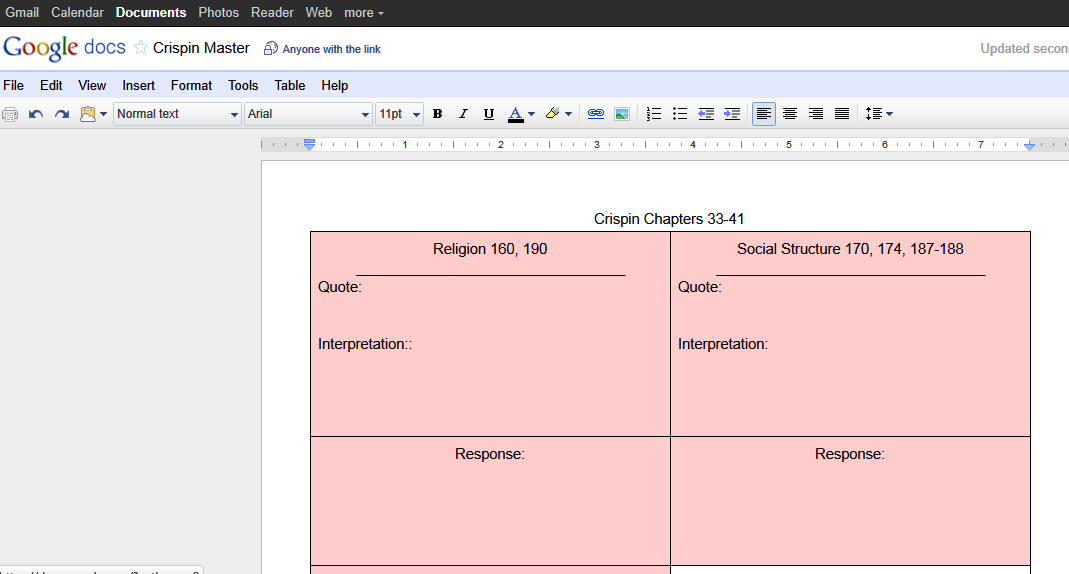 |
| scroll over pic to see descriptions of key elements |
Each group was then given a laptop, and I hooked my laptop up to the LCD projector. I projected the master document onto the wall.
I then gave each group two slips of paper - the first was the topic they had to post about, the 2nd was the topic posting they'd comment on.
Groups went to work. As they decided on the quotes and analysis for their posts, I could see each group typing in real time, as could the rest of the class. Once a group finished their post, they then read another group's entry and responded to it. The filled in form, in class, looked like this:

By the end of the period, we had a full chart - you can see the results here. I then saved the document under a new title - indicating the assignment and the period - and turned off the "anyone can edit" option. I then went back to the master document, clicked on "revision history," selected the original, blank version, and reverted to it -- I was ready for the next class, had saved all the work the kids did, and it was much faster than erasing the board!
At the end of the day, I then posted links to all the finished discussion documents on our discussion board:

This way, students could reference these discussions later - especially when gathering evidence for major assignments. Also, they could see the key ideas developed in the other classes - something that was impossible on a standard white board.
Overall, this approach worked out better than I had anticipated. It had the following benefits over my old way of doing things:
- It streamlined the sharing process - each group could write 'on the board' at the same time.
- Whereas before I'd be hard pressed just to get all the initial quotes on the board during a period, I now had time for the students to critique one another.
- No more handwriting issues on the board - easy to read font.
- By saving the work in these files, the current students could review their peers' work later, and I could even incorporate the class work into a reflective piece later on (like reviewing the posts for homework, and choosing the strongest analysis).
- I have exemplars for future students / years.
- I also found that students became eager to revise their work - on a number of occasions, while one group was critiquing another group's response, I'd see a cursor going back over the original post, trying to improve it before the commenter was even done typing!
Saturday, July 23, 2011
A way to help those procrastinators

Having just read Richard Byrne's post on task management tools for students, I am struck by the potential of one of the tools he describes.

Once you hit send, the recipient will get reminders until they respond that the task is completed.
While I wouldn't use this with all students - it would be tedious at best, and annoying and enabling at its worst - it could be quite useful for a few chronic procrastinators, or for the occasional parent who really needs to keep on top of what the child is doing towards a particular task.
Subscribe to:
Posts (Atom)