Pages

Showing posts with label character analysis. Show all posts

Thursday, August 11, 2011

Google Docs for group classwork

On my team, we use Google Docs for a lot of our "paperwork" - each student sets up an account at the start of the year, and each teacher on team also has a Google Docs account (our school has also partnered with Google, so that we have our own 'channel' on google docs).

I've already discussed one way we use GD on team - students do their organizing and drafting of papers right online, streamlining the writing / editing process while saving a ton of paper (with school budgets being what they are, every dime counts!).

Beyond this, we do a number of collaborative tasks - both among the staff and the students  - through GD as well.  Our team newsletters, sent out at least monthly, used to be constructed via a chain of emails - each teacher would send me their snippet, I'd then merge them into a doc, and then send it out.  Now, we keep a newsletter "shell" and just fill it in by a set time / date - each of us adding our blurb when we have the time - and then, once it's set, I email it out and post it on our team discussion board.  Much easier.

Last year, I wanted to use GD to facilitate collaborative discussions among the students, as well.  I started with a fairly standard classroom discussion model: while reading Crispin, at set intervals students met in groups to discuss specific chapters.  The kids had been tracking facets of the novel in a series of shell note sheets, and - on discussion days - kids would be put into groups, and each group was given one facet as a focal point.  After a few minutes, they would send one member to the board to write a key quote they found, and their group's analysis of its importance.  We'd then discuss these as a class.

This format had a few problems.  First, the board would get crowded pretty quickly - as would the space where students stood while writing.  Often, one student would have to wait for another to finish.  Second, the work was transient - by the end of the period, I'd have to erase the work in order to be ready for another class.

So, this brought me to my inquiry - could I figure out a way to use GD to streamline the process and eliminate the bottleneck, while using only a limited amount of computers (we have a laptop cart on team that, usually, only has around 6 working units).

Here's what I came up with.  My solution uses 6 laptops and one LCD projector.

I began by setting up a discussion document that students could access on Google Docs.  I made it public, so anyone could edit it, and posted the link on the class discussion board.  It looked like this:
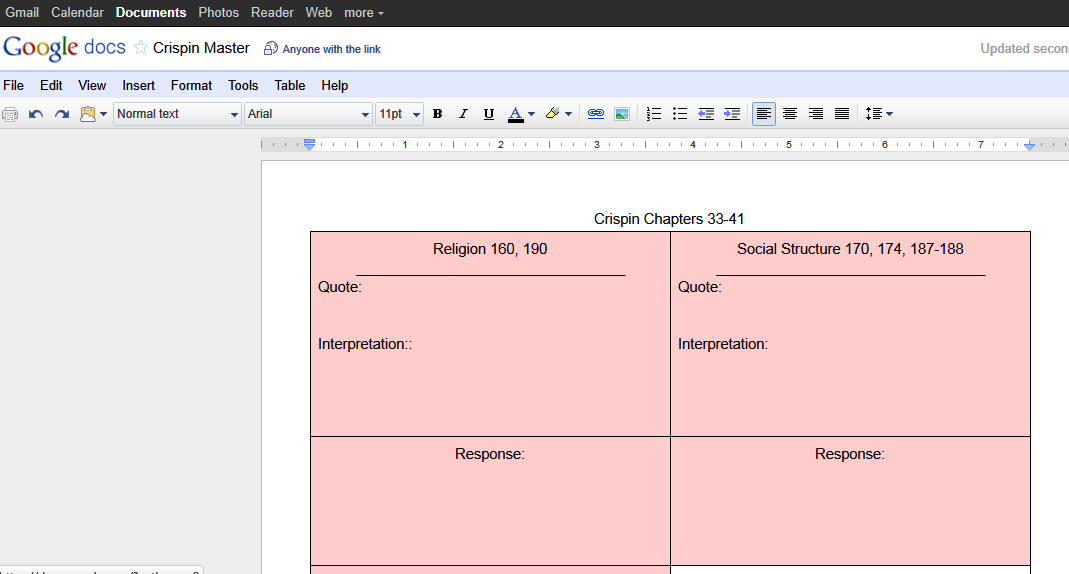
scroll over pic to see descriptions of key elements

Each group was then given a laptop, and I hooked my laptop up to the LCD projector.  I projected the master document onto the wall.

I then gave each group two slips of paper - the first was the topic they had to post about, the 2nd was the topic posting they'd comment on.


Groups went to work.  As they decided on the quotes and analysis for their posts, I could see each group typing in real time, as could the rest of the class.  Once a group finished their post, they then read another group's entry and responded to it.  The filled in form, in class, looked like this:

By the end of the period, we had a full chart - you can see the results here. I then saved the document under a new title - indicating the assignment and the period - and turned off the "anyone can edit" option.  I then went back to the master document, clicked on "revision history," selected the original, blank version, and reverted to it -- I was ready for the next class, had saved all the work the kids did, and it was much faster than erasing the board!

At the end of the day, I then posted links to all the finished discussion documents on our discussion board:


 This way, students could reference these discussions later - especially when gathering evidence for major assignments.  Also, they could see the key ideas developed in the other classes - something that was impossible on a standard white board.


Overall, this approach worked out better than I had anticipated.  It had the following benefits over my old way of doing things:
  • It streamlined the sharing process - each group could write 'on the board' at the same time.
  • Whereas before I'd be hard pressed just to get all the initial quotes on the board during a period, I now had time for the students to critique one another.
  • No more handwriting issues on the board - easy to read font.
  • By saving the work in these files, the current students could review their peers' work later, and I could even incorporate the class work into a reflective piece later on (like reviewing the posts for homework, and choosing the strongest analysis).
  • I have exemplars for future students / years.
  • I also found that students became eager to revise their work - on a number of occasions, while one group was critiquing another group's response, I'd see a cursor going back over the original post, trying to improve it before the commenter was even done typing!
My question, though, is would a blog be as good or better for this sort of work?

Thursday, August 4, 2011

Web tools to give history context

Free Technology for Teachers has turned me on to a couple sites that, together, can be very powerful ways for students to contextualize time and place.

The first tool is Historypin - the video below highlights the new features, as of their July upgrade:

You can access Historypin via the internet or through an Android app.  Online, there's an interactive map, where students can zoom in to a region and, as seen in the video, look at historic pictures and videos overlaid on a modern shot of the same location.

This is the sort of thing I could toy with for hours - to see what was, juxtaposed onto what is, is fascinating.  They also have audio clips, collections of photos based on various themes, tours of a region based on an historic theme...

And if you install the Android app, you can use your phone to view historic photos of the location where you are standing -- provided they have those pics on file, or you can upload your own to create a tour of your town, or a field trip location...

How would I use this in the classroom?  I can think of a number of applications:
  • In a history classroom, this could be incredibly powerful - especially when studying traumatic events like WW II - students can really grasp the level of devastation when viewing modern scenes, overlaid with pictures of, say Dresden after the bombing.
  • Create a local history tour, for kids to grasp how their community has changed over time: visit your local library and get permission to scan / access historic photos, upload them to the site and link them to a current map.  This could then be the basis for reflective writing, research...
  • Classic photos are a great writing prompt tool - getting students to step into the minds and shoes of someone from another era, reflecting on the world through their eyes.
And this brings me to the second tool:

This project has received a lot of buzz, as well it should.  On 10-10-10, people across the globe were asked to film their lives, and upload the footage.  Together, these clips are being produced into one video that gives a snapshot of human life, on one day, on every continent.  This video reminds me of another one - Babies - designed, similarly, to show our common humanity among our differences.  Here are the trailers for both movies:


Often, we humans have a tendency to classify those who are different as 'the other' - losing touch with some of our common humanity.  These videos bring us back in touch with one another, allowing us to see some of our commonality amid our differences.

How would I use these in the classroom?  As I've mentioned, my students read a book based in Afghanistan - giving them some videos of daily life from that part of the earth, videos of normalcy beyond the ravages of war, would help them connect to the characters.  This could apply to any cultural study...

So, there you have it.  A couple great web tools for bringing our students closer to the times and places they study - and, more importantly, to the people who inhabit these locations.

Friday, July 22, 2011

Fakebook - a nice way to do character analysis

On my team last year, the social studies teacher had students creating imaginary Facebook pages to demonstrate their understanding of historic figures.  The students planned them out on a template, then created paper versions of the imagined online profiles.  The results were good, but the irony of creating a paper simulacrum of a digital identity really stood out.  I imagined using a similar tool in my class, wherein students would track a character's development through a profile page - for A Midsummer Night's Dream, I could imagine Oberon's profile:  for relationship status, he's put "it's complicated;"  his current status could easily be "is invisible and watching two humans argue."  He would friend almost any female that crossed his path, be alternately attached to and then unfriended by Titania, etc.

What held me back was the paper aspect.

Along comes Fakebook - a very easy to use mock up of a Facebook profile page.  Students click on fields and fill in the details - creating a product with no concerns about formatting, layout, design - it's all there.  Students can save their work, print it, or even embed them into a class page or blog, should they choose and - with some planning - a teacher can quickly review them online or collect paper copies for assessment purposes.

This sort of tool is a great one for teachers just getting their feet wet with online assignments - and it's just one of the many tools available from Classtools.net - I urge everyone to give it a look!